
Update Price For Single Item
AlignBooks provides a flexible and efficient way to update item rates, whether for a single product or multiple items simultaneously, based on predefined price lists. These price lists are tailored to meet various business needs, allowing you to set specific pricing structures for different customers, promotional events, seasonal discounts, or any unique business scenario.
During the billing process, when you select a specific price list, the system automatically applies the predefined rates for the items included in that list.
Key Benefits of Updating prices based on Price List:
-
Automated Pricing: Eliminates manual rate entry by automatically applying predefined item rates.
-
Time-Saving: Speeds up the billing process, reducing errors and improving efficiency.
-
Customer-Specific Pricing: Enables personalized pricing for different customers or customer groups.
-
Discount & Promotion Management: Easily apply special rates for festive offers, bulk purchases, or seasonal discounts.
-
Consistency & Accuracy: Ensures uniform pricing across all transactions, minimizing discrepancies.
-
Better Profit Control: Helps set strategic pricing for different business scenarios, optimizing revenue.
-
Flexibility in Business Operations: Supports multiple pricing structures for various market segments.
-
Enhanced Customer Satisfaction: Provides transparency and reliability in pricing, fostering customer trust.
-
Go to Sales > Sales Price List > Update Price For Single Item.

-
In 'Item' dropdown, select the item whose rate you wants to update and click on 'Ok' button.

-
Here, you can view the Rate List name and update item rates such as Dealer, Wholesale Rate, MRP, etc., for a specific rate list as per your requirement.
If you haven't created a Price List, the data will not appear here for updating the item's rate. To create a Price List, Click Here.
|

-
Here, you can update the Sales rate as per your requirement.
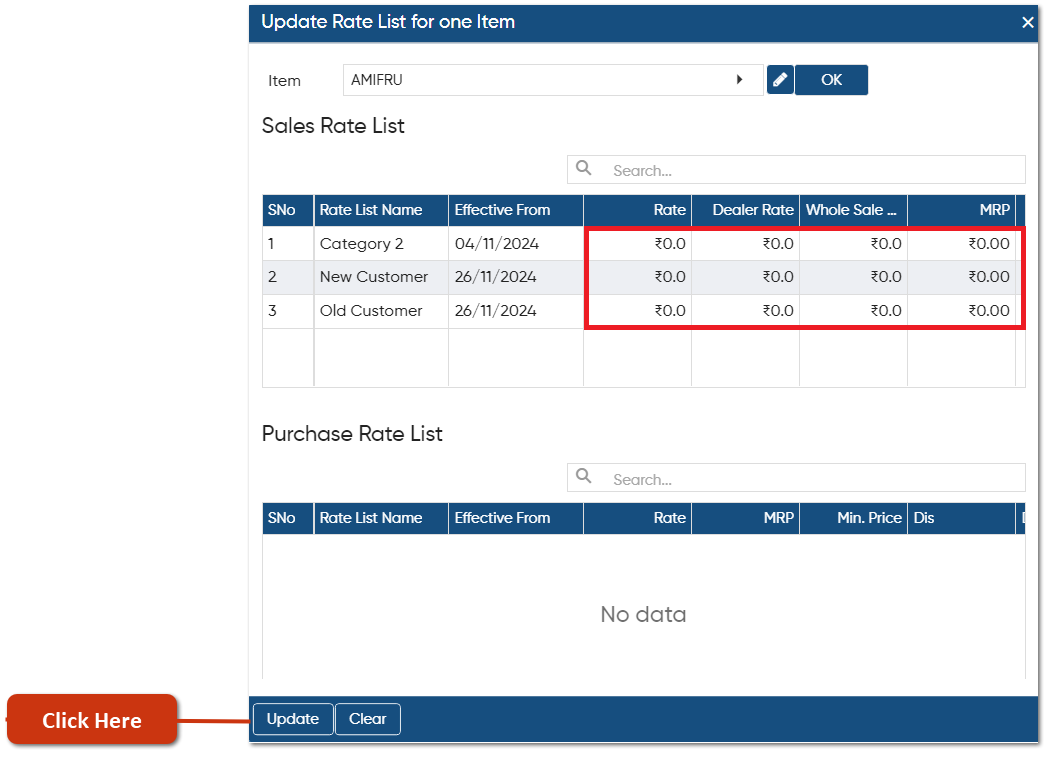
In this way you can Update Rate List For One Item in AlignBooks.